




STAFF BLOGスタッフブログ
【HTML/CSS】会社概要に!罫線に余白があるtable
スタッフブログをご覧の皆さま、こんにちは!つんです。
Webサイト制作で必ずと言っていいほど登場する「会社概要」のtable。
デザイン通りにコーディングしようとした時、こんなことで悩みませんか?
「thの右に線を引きたいけど、上下に余白(隙間)を空けるにはどうすればいい?」
「PCでは綺麗にできたのに、スマホで見るとレイアウトが崩れたりする…」
今回はそんな悩みを解決させた「罫線に余白を持たせつつ、スマホでも綺麗に縦積みされるtable」のコードを紹介します!
完成イメージ
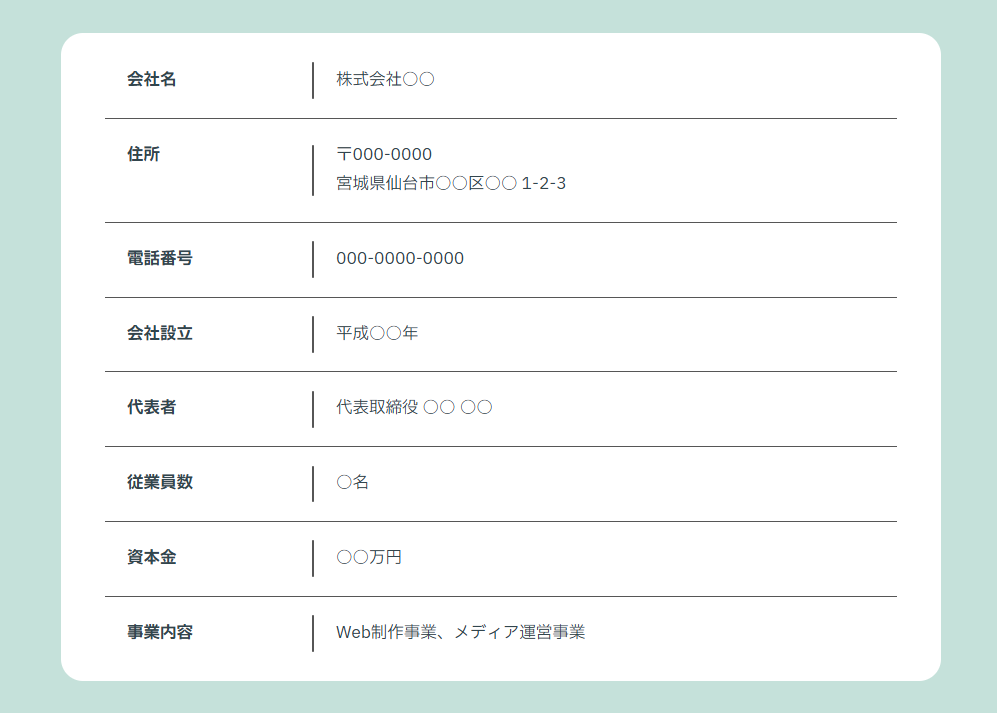
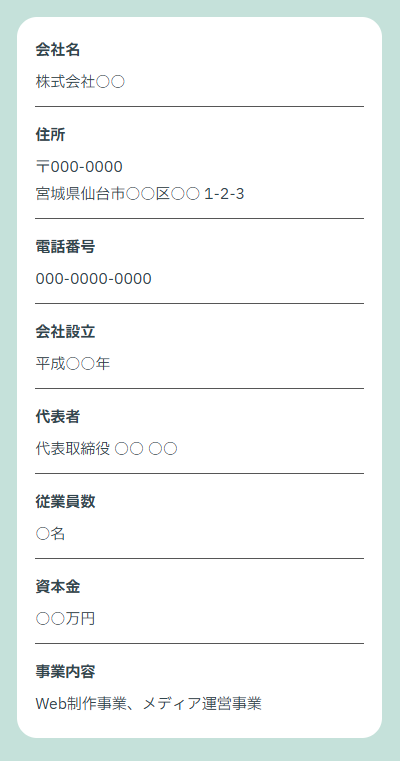
完成イメージはこのようになります。
PC版
スマホ版
ソースコード
HTML
<div class="company-profile">
    <div class="table-container">
        <table class="profile-table">
            <tbody>
                <tr>
                    <th>会社名</th>
                    <td>株式会社○○</td>
                </tr>
                <tr>
                    <th>住所</th>
                    <td>〒000-0000<br>宮城県仙台市○○区○○ 1-2-3</td>
                </tr>
                <tr>
                    <th>電話番号</th>
                    <td>000-0000-0000</td>
                </tr>
                <tr>
                    <th>会社設立</th>
                    <td>平成○○年</td>
                </tr>
                <tr>
                    <th>代表者</th>
                    <td>代表取締役 ○○ ○○</td>
                </tr>
                <tr>
                    <th>従業員数</th>
                    <td>○名</td>
                </tr>
                <tr>
                    <th>資本金</th>
                    <td>○○万円</td>
                </tr>
                <tr>
                    <th>事業内容</th>
                    <td>Web制作事業、メディア運営事業</td>
                </tr>
            </tbody>
        </table>
    </div>
</div>
CSS
/* ベースのスタイル(必要に応じて調整してください) */
.company-profile {
  width: 100%;
  background-color: #C5E1DA; /* 外側の背景色 */
  padding: 50px 20px;
  box-sizing: border-box;
  font-family: "IBM Plex Sans JP", sans-serif;
  color: #32454D;
  line-height: 1.8;
}

.table-container {
  max-width: 800px; /* テーブルの最大幅 */
  width: 100%;
  margin: 0 auto;
  background-color: #fff;
  border-radius: 20px;
  padding: 10px 0; /* 上下の余白 */
}

/*-----------------------------------
  テーブル本体のデザイン
-----------------------------------*/
.profile-table {
  width: 90%; /* コンテナ内で少し小さくして左右の余白を作る */
  margin: 0 auto;
  border-collapse: collapse; /* 隙間をなくす */
  font-size: 15px;
}

.profile-table th,
.profile-table td {
  padding: 20px;
  text-align: left;
  position: relative;
  vertical-align: top;
}

.profile-table th {
  width: 150px; /* PCでの項目幅 */
  font-weight: bold;
}

/* 下線(共通) */
.profile-table tr {
  border-bottom: 1px solid #565656;
}

/* 最後の行だけ下線を消す */
.profile-table tr:last-child {
  border-bottom: none;
}

/*-----------------------------------
  thの右側の縦線(疑似要素)
-----------------------------------*/
.profile-table th::after {
  content: "";
  display: block;
  width: 2px;
  height: 50%; /* 線の高さ(余白を作るポイント) */
  background-color: #565656;
  position: absolute;
  right: 0;
  top: 25%; /* 中央に配置 */
  border-radius: 40px;
}

/*-----------------------------------
  スマホ対応(レスポンシブ)
-----------------------------------*/
@media screen and (max-width: 640px) {
  .profile-table {
    width: 90%;
  }

  /* テーブル要素をブロック化して縦積みにする */
  .profile-table tr,
  .profile-table th,
  .profile-table td {
    display: block;
    width: 100%;
    box-sizing: border-box;
  }

  .profile-table tr {
    margin-bottom: 5px;
    border-bottom: 1px solid #565656;
  }

  .profile-table tr:last-child {
    margin-bottom: 0;
    padding-bottom: 0;
    border-bottom: none;
  }

  .profile-table th {
    padding: 10px 0 5px;
    width: 100%;
  }

  .profile-table td {
    padding: 0 0 10px;
  }

  /* スマホではth右の縦線を消す */
  .profile-table th::after {
    display: none;
  }
}
解説
項目の隣(thの右)にある縦線について
ここが一番のポイントです!
単に border-right を使うと、セルの高さいっぱいに線が引かれてしまい、上下に余白が作れません。
そこで、th の ::after(疑似要素)を使っています。
・height: 50% … 線の長さをセルの高さの半分にする
・top: 25% … 上から25%の位置に配置する
これで、上下均等に余白を作ることができます。
レスポンシブについて
スマホ(幅640px以下)で見たときは、無理に横並びにせず縦積みに変更しています。
・display: block; を指定して、セルをブロック要素化
・th の右にあった縦線(::after)は display: none; で非表示に
これで、スマホの狭い画面でも文字が読みやすいレイアウトになります。
まとめ
今回は、罫線に余白を持たせつつ、スマホでも綺麗に縦積みされるテーブルのソースコードを紹介しました。
コピペして、色や幅を案件に合わせて調整してみてください。 会社概要の実装で迷った時の助けになれば嬉しいです!



最近の記事RECENT POSTS




人気の記事POPULAR POSTS


カテゴリーCATEGORY


Contact usお問い合わせ
-
 会社案内ダウンロード
広告代理・制作のご検討されたい方へ
会社案内ダウンロード
パンフレットをご用意しております。 -
 お問い合わせ・ご相談
ホームページ制作・運用・更新についての
お問い合わせ・ご相談
ご相談やお問い合わせはこちら -
 お電話でのお問い合わせ
お電話でのご相談も随時受け付けております。
お気軽にご連絡ください。 022-716-3883
平日 10:00~19:00
022-716-3883
平日 10:00~19:00